
CureViz › 360° virtual tour and digital scale model for residential projects
360° virtual tour and digital scale model for residential projects
Buyers choose a unit inside the tour and get their offer from the same place.
- Tour the project
- Pick on the facade
- See the location
- Get an offer
From tour to offer
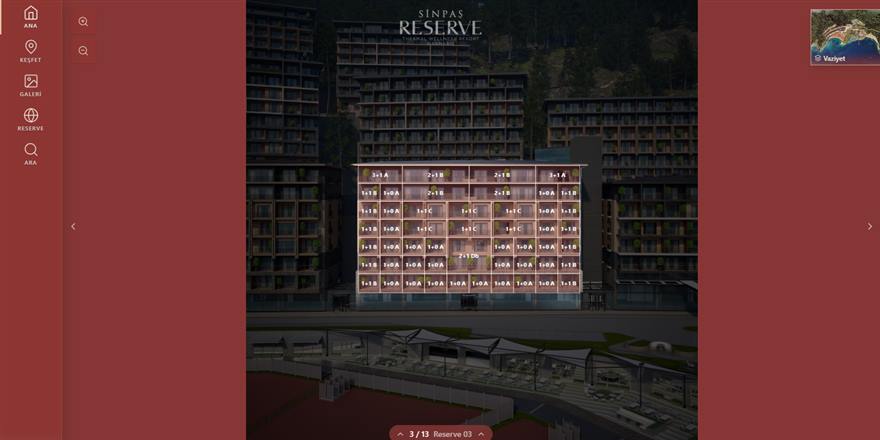
Buyers pick a unit on the building facade and its type, area, floor and current price appear on the same screen. They don’t need to call to ask about price.
A unit that has been sold also shows as sold in the tour. The sales office, the website and the link sent to the buyer all use the same data.
Picking units on the facade: mesh
Every unit on the render becomes a clickable surface, colored as available, reserved or sold. Buyers see the vacant units on the facade without asking a rep.
If you want price and status shown only to visitors who sign in, you can switch that on in the project settings.
The physical model, made digital
The physical model in the sales office is shown only to buyers who visit the office, and it doesn’t change as prices and availability do. The digital scale model in CureViz shows the same building on screen: units are colored as available, reserved or sold and update along with the price list.
The same model opens on the big screen in the sales office, on the rep’s tablet and in the link sent to the buyer. Your digital sales office reaches the buyer’s phone.
Location and nearby points
Hospitals, schools, shopping centers, public transport and highways are marked on the aerial panorama. The location page shows the distance and route to each point.
The same tour everywhere
The same tour opens on the big screen in the sales office, on the rep’s tablet, on your website and in the link sent via WhatsApp. You can also start a video call with a remote buyer and tour it together.
New platform data, January – October 23, 2026. CureViz has been in use since 2015.
Frequently asked questions
Can we use our existing renders and panoramas?
Yes. Your renders, panoramas and plans are imported into the system. If you don’t have visuals yet, the Saydam Tasarım team handles 360° photography, 360° rendering or 3D modeling from aerial photogrammetry.
Can we add the tour to our own website?
Yes. The tour runs at its own address and can be embedded in your website. You can also build your project page inside CureViz.
Does it work on mobile and tablet?
Yes. The tour runs on phone, tablet and desktop with the same data, and there’s no app to download.
Can a digital scale model replace a physical one?
A physical model can only be seen in the office and doesn’t change when prices or availability do. A digital scale model opens on any screen and updates along with your inventory. You can also use both.
Are prices visible to everyone?
You decide. If you prefer, price and status are shown only to visitors who sign in.
Other solutions: Homes and villas · Timeshare · Commercial · Land plots · Real estate CRM · Online offers · Location and discovery · Flexible payment plans · Video calls · Agency management · Reporting · Devices and languages · CRM integration
See CureViz with your own project.
In a short demo, we’ll show how your sales office would run on CureViz.